

The only recommendation on this site: Revue Newsletter Review
I rarely make recommendations on this site, but Revue is an exception. After trying many newsletter tools, I consistently get the best results with Revue. It’s simple, flexible, and designed for people who want to send thoughtful, curated email newsletters without a steep learning curve.
Highlights of Revue Newsletter:
- Write a personal, well-formatted email newsletter with an editor designed for curated content.
- Drag-and-drop interface makes it easy to assemble sections and reorder items quickly.
- Connect multiple content sources for curation, including Twitter, Instagram, RSS feeds, Pocket and Medium, so you can pull together the best links and media in one place.
- Import subscriber lists via Mailchimp integration to transition smoothly from other platforms.
- Create signup forms for Facebook, Twitter, and your own website to grow your audience.
- A Chrome extension allows you to curate while you browse, saving articles and media directly into your next issue.
How Revue works:
- Collect content: Use the Chrome extension or add sources to gather articles, tweets, images, and videos.
- Compose: Arrange selected items with drag-and-drop, add commentary or personal notes, and format sections for clarity.
- Schedule: Choose when to send and preview how the newsletter will appear in subscribers’ inboxes.
- Publish and share: Send the email and optionally post to social channels linked to your account.
Revue is built around curation and voice. Instead of forcing a template-driven, marketing-first approach, it allows creators to focus on content and commentary. If your goal is to share a curated set of links, commentary, and media in a personal format, Revue delivers a straightforward workflow that feels natural and keeps subscribers engaged.
Try Revue PRO for free: Sign up using this referral link to try PRO at no cost. If you decide to stay on, use the code ROBYN at signup to receive an additional 30 days of PRO for free.
My Revue Newsletter Stats
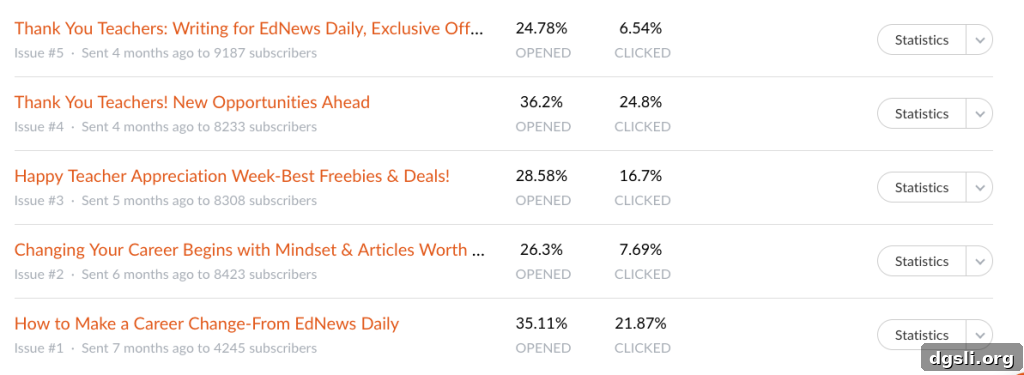
Above are screenshots from my Revue account that show how curated items appear and how the dashboard organizes issues. These images illustrate the clean presentation and the way links, images, and notes are combined into a single, readable newsletter.
Front page of Revue Newsletter
Whether you’re starting a newsletter to build an audience, curate resources for colleagues, or share a personal digest of links and ideas, Revue makes the process quick and enjoyable. Its combination of simple design tools, integrations, and a focus on readable, human-centered newsletters means you spend less time wrestling with templates and more time crafting useful content.
If you value a newsletter platform that prioritizes curation, voice, and ease of use, give Revue a try. The free PRO trial through the referral link lets you explore premium features without commitment, and the additional code provides an extended window to evaluate whether it fits your workflow.
You’ll likely enjoy it as much as I do.